Seedream 5.0 Pro vs GPT Images 2.0: Real Tasks Comparison
AI image generation is moving from simple image creation to professional visual production. Both Seedream 5.0 Pro and GPT Images 2.0 represent advanced AI image generation approaches, but they focus on different strengths.
GPT Images 2.0 is known for stronger semantic understanding and autonomous interpretation, helping users transform complex ideas into images with less detailed guidance.
Seedream 5.0 Pro focuses more on visual control, reference-based creation, and design-oriented workflows, making it suitable for users who need consistent commercial visuals.
This comparison explores their differences through practical creative scenarios, helping designers, marketers, and creators choose the right AI image generator for different workflow.
8 Creative Tests: Which AI Image Generator is Better?
1. AI Art Style Generation
Both models perform strongly, with only minor differences in artistic expression.
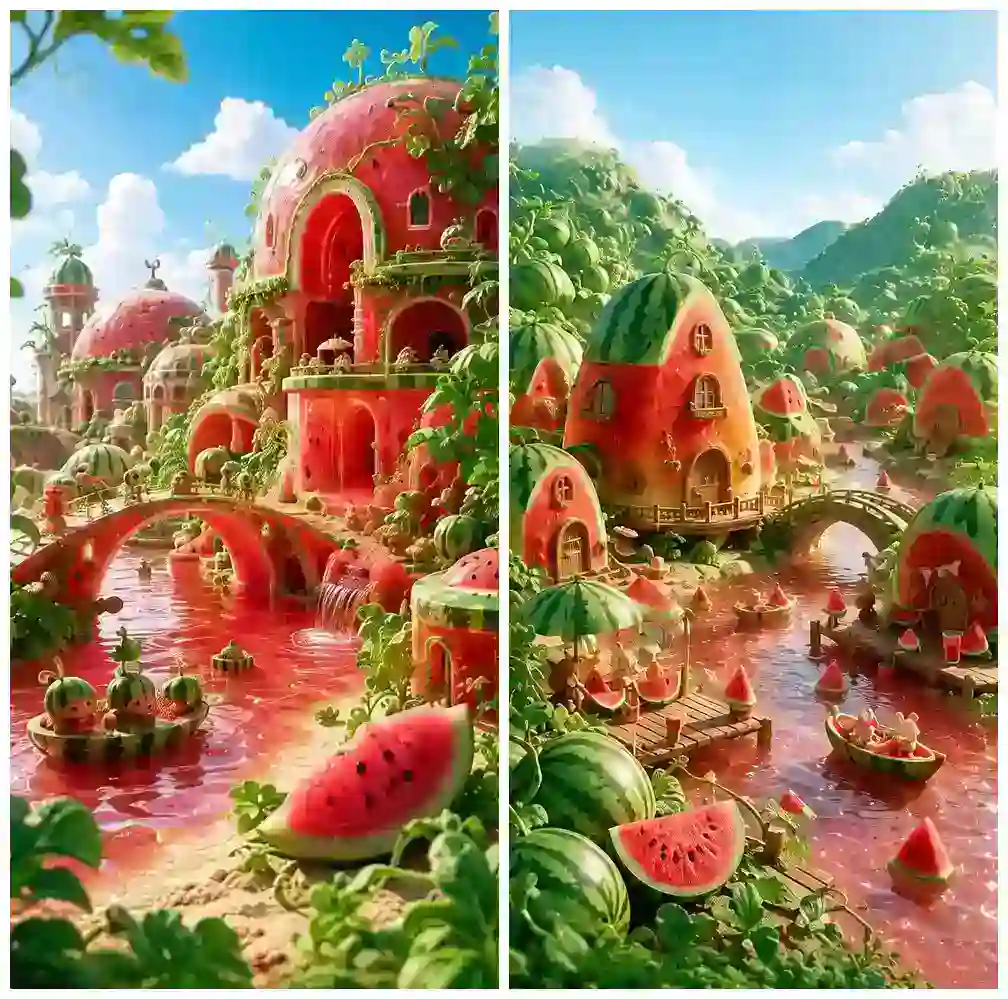
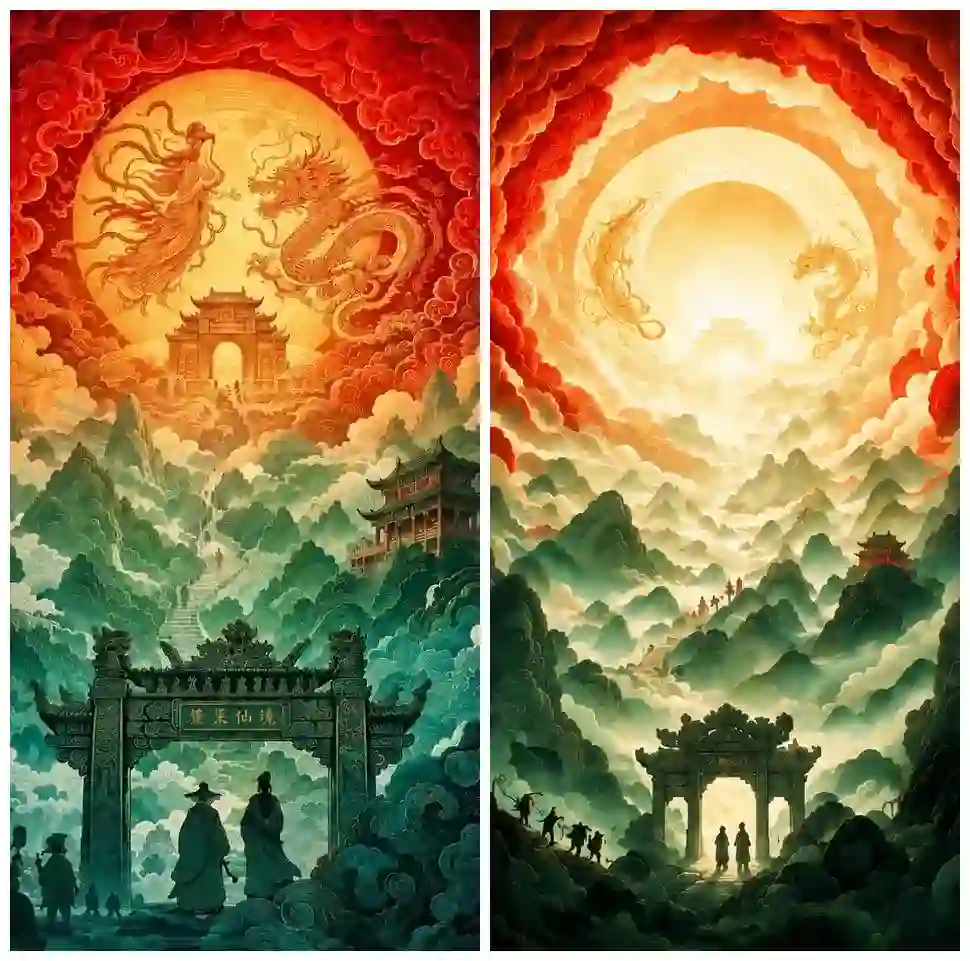
Left image: GPT Images 2.0 output. / Right image: Seedream 5.0 Pro output.
For artistic styles, illustrations, fantasy scenes, and concept designs, both models can:
follow style instructions
maintain visual consistency
create detailed creative images
GPT Images 2.0 often creates more expressive and concept-driven results.
Seedream 5.0 Pro usually produces cleaner compositions with brighter colors and more balanced visual presentation.
For pure artistic exploration, the difference is relatively small.
2. Realistic Image Generation
In realistic scenes, both models can generate high-quality images.
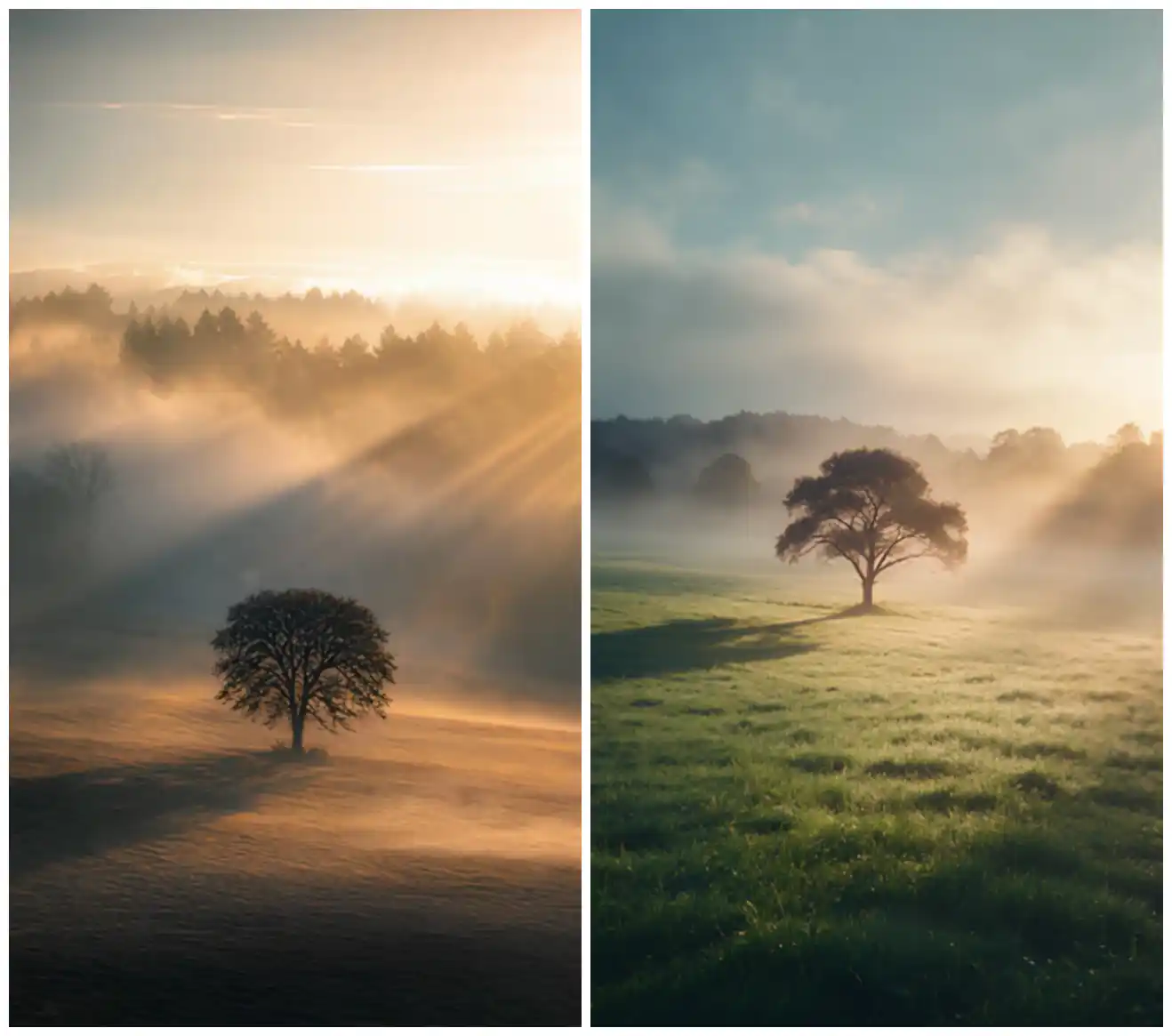
Left image: GPT Images 2.0 output. / Right image: Seedream 5.0 Pro output.
However, GPT Images 2.0 may sometimes enhance darker areas with excessive texture and contrast, creating a slightly processed or AI-like appearance.
Seedream 5.0 Pro tends to deliver:
cleaner lighting
clearer visual focus
more natural color balance
stronger photographic feeling
For:
product photography
lifestyle images
commercial visuals
Seedream’s cleaner style can create a more realistic and professional impression.
3. AI Portrait Generation
Natural human appearance is where visual style differences become obvious.
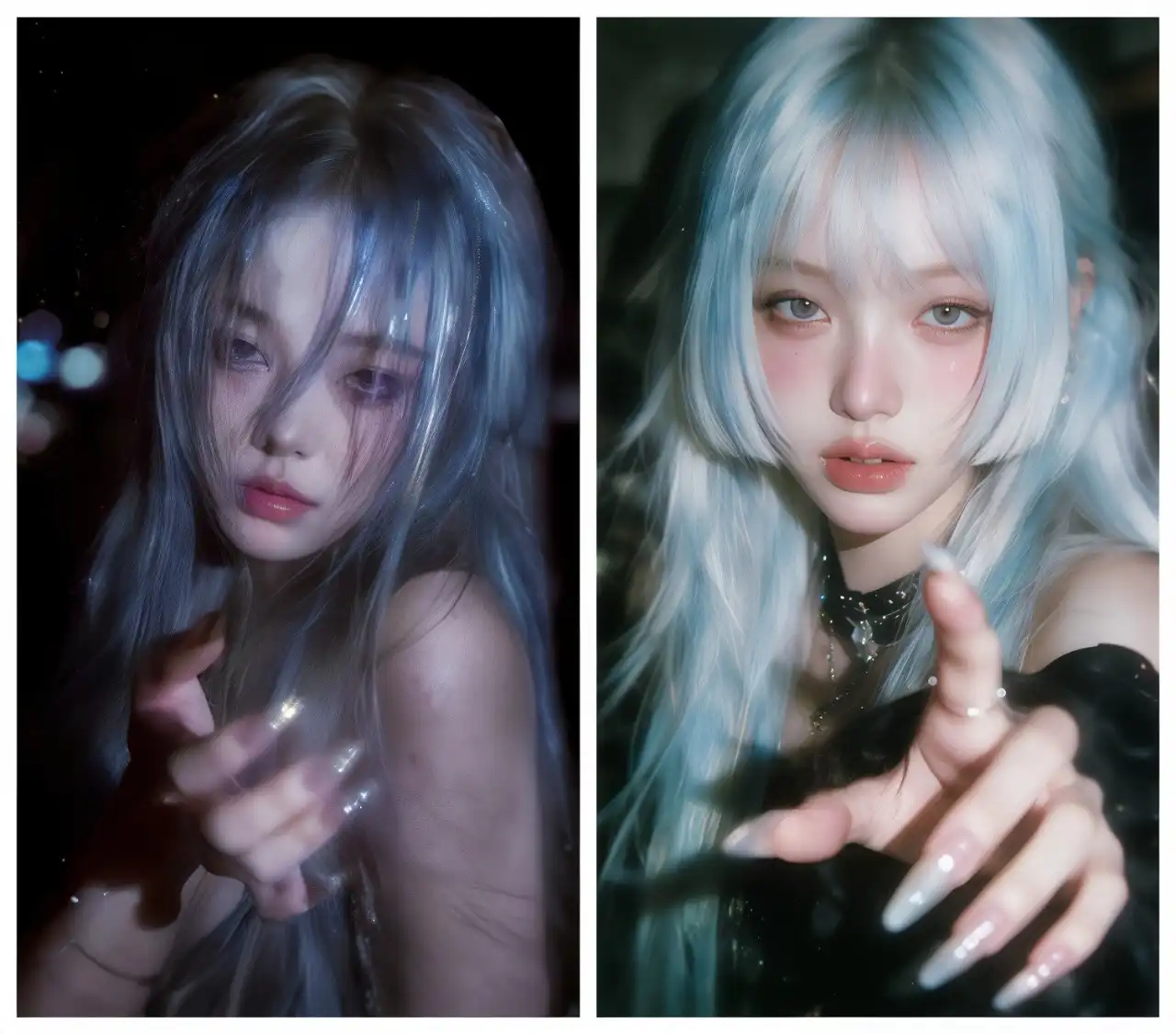
Left image: GPT Images 2.0 output. / Right image: Seedream 5.0 Pro output.
GPT Images 2.0 can create attractive portraits with strong artistic atmosphere, but some results may appear more stylized.
Seedream 5.0 Pro generally produces:
more natural facial details
realistic skin texture
balanced lighting
closer-to-real photography results
For:
AI fashion images
professional portraits
virtual characters
marketing people images
Seedream’s realistic direction can be more suitable.
4. Anime and Character Creation
Both create strong characters, but Seedream delivers a cleaner visual style.
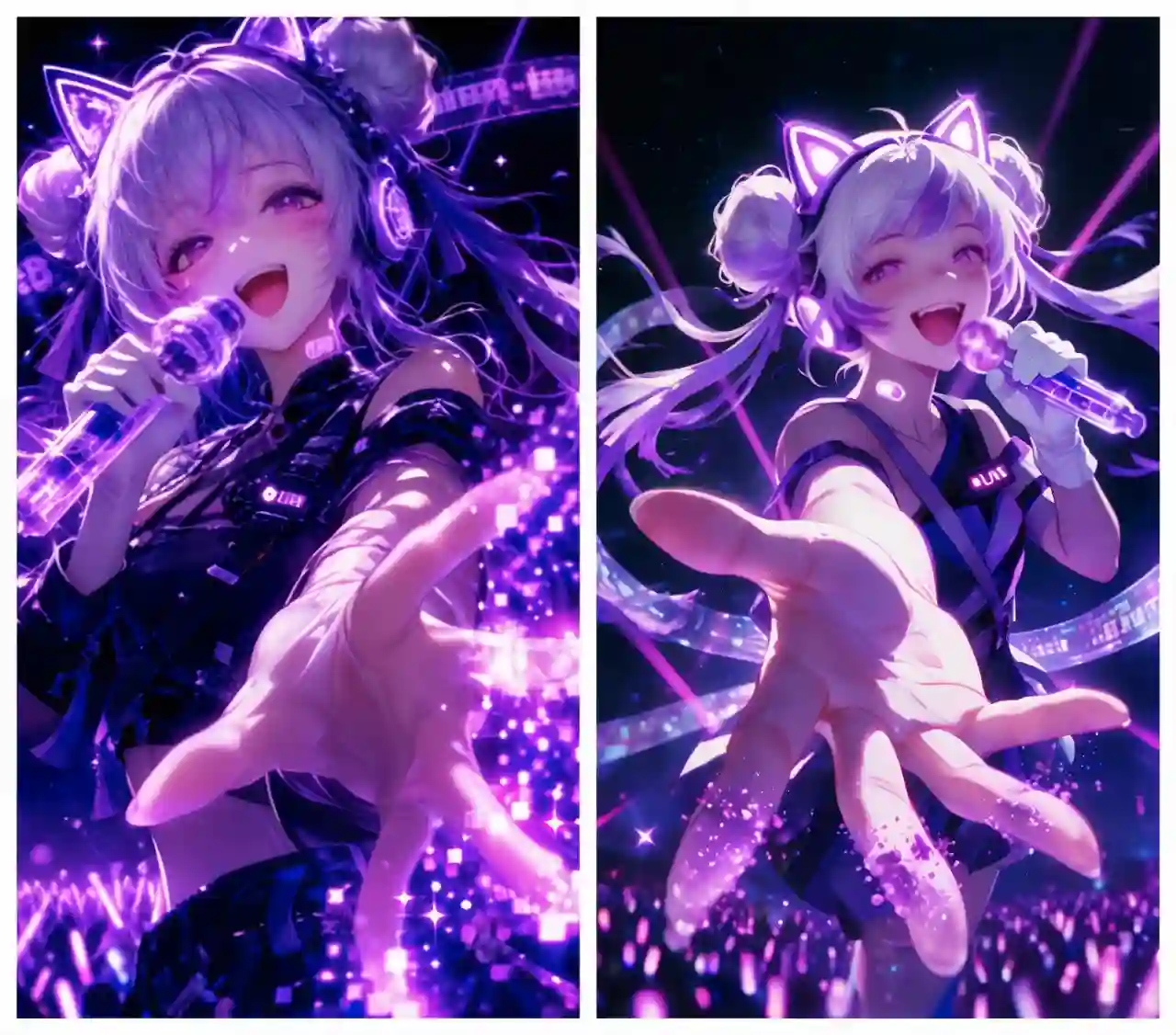
Left image: GPT Images 2.0 output. / Right image: Seedream 5.0 Pro output.
GPT Images 2.0 often produces anime visuals with:
stronger contrast
darker atmosphere
higher saturation
The result can feel more dramatic but sometimes slightly heavy.
Seedream 5.0 Pro tends to create:
brighter images
cleaner colors
clearer character focus
This makes Seedream suitable for creators who want attractive, polished anime visuals for social media or storytelling projects.
5. Standard AI Image Editing
Both models can handle common editing requests effectively.
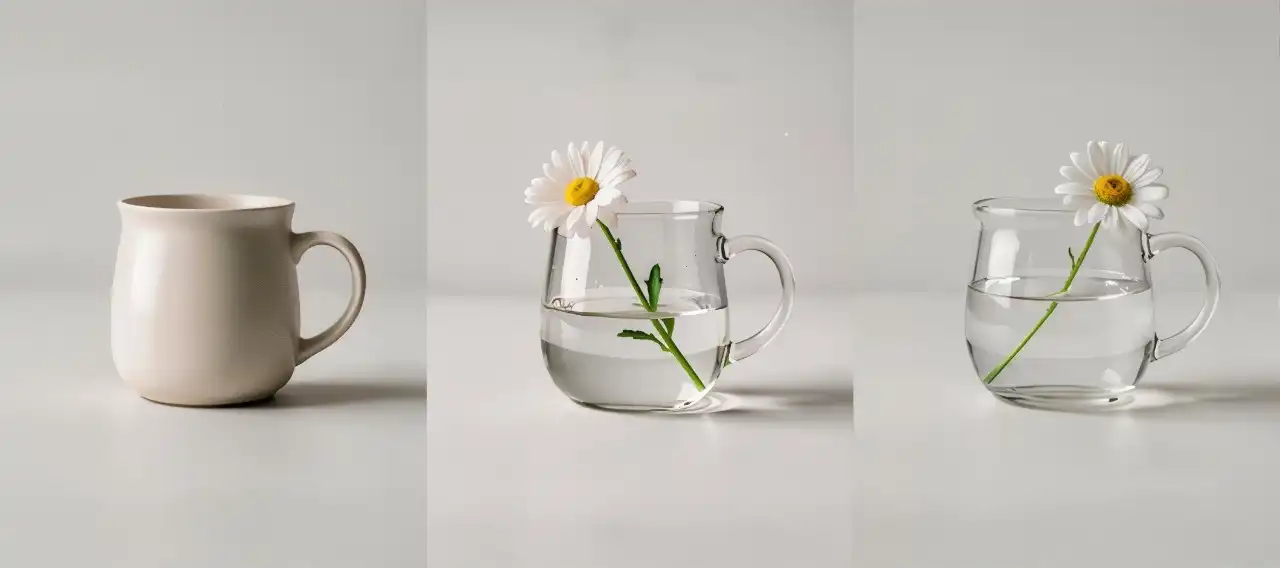
Prompt: "Transform the cup into a glass cup and add a blooming white daisy with half a cup of water."
Left: Original image / Center: GPT Images 2.0 / Right: Seedream 5.0 Pro
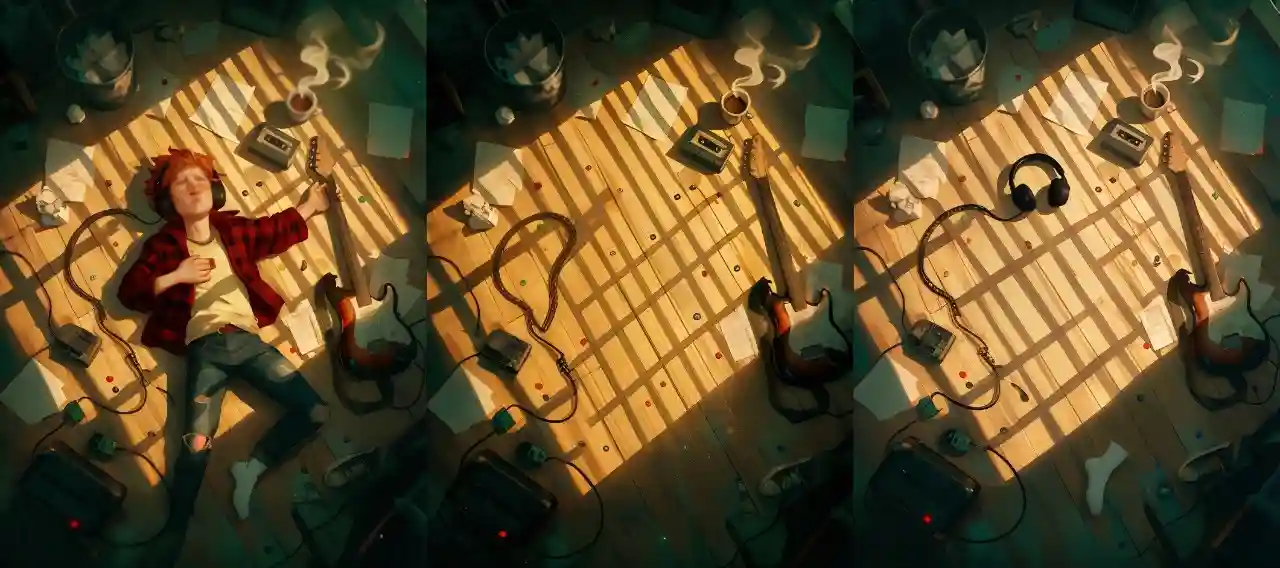
Prompt: “Remove the person in the center of the image.”
Left: Original image / Center: GPT Images 2.0 / Right: Seedream 5.0 Pro
For tasks such as:
object modification
style changes
image enhancement
both models perform well.
GPT Images 2.0 preserved the overall image consistency, but it failed to infer the headphones from the visible cable, resulting in a missing element in the generated image.
Seedream 5.0 Pro provides stronger value when creators need:
reference consistency
controlled changes
design-focused editing
6. Multi-Element Image Composition
Reference control becomes the key difference in complex compositions.

Prompt: "Precisely extract the object from the provided white background image and place it into the background scene while preserving its original position, creating a realistic product photography scene."
Top: Input image / Middle: GPT Images 2.0 output / Bottom: Seedream 5.0 Pro output
When combining multiple elements, GPT Images 2.0 may sometimes change:
image proportions
composition structure
visual arrangement
Seedream 5.0 Pro performs better in reference-driven workflows by maintaining stronger control over:
multiple image inputs
subject relationships
visual consistency
This makes Seedream 5.0 Pro more suitable for:
product collections
character design
brand campaigns
creative projects requiring consistency
7. Poster and Graphic Design
GPT creates stronger visual surprises, while Seedream provides more controlled design output.

Left image: GPT Images 2.0 output. / Right image: Seedream 5.0 Pro output.
GPT Images 2.0 often has an advantage in:
dramatic composition
unusual perspectives
strong visual impact
Seedream 5.0 Pro can create cleaner and more balanced designs, but sometimes feels more conservative.
For creative exploration, GPT may produce more unexpected ideas.
For commercial design workflows, Seedream offers more predictable results.
8. Infographic Generation
Simple prompts favor GPT, while detailed instructions unlock Seedream’s design strength.
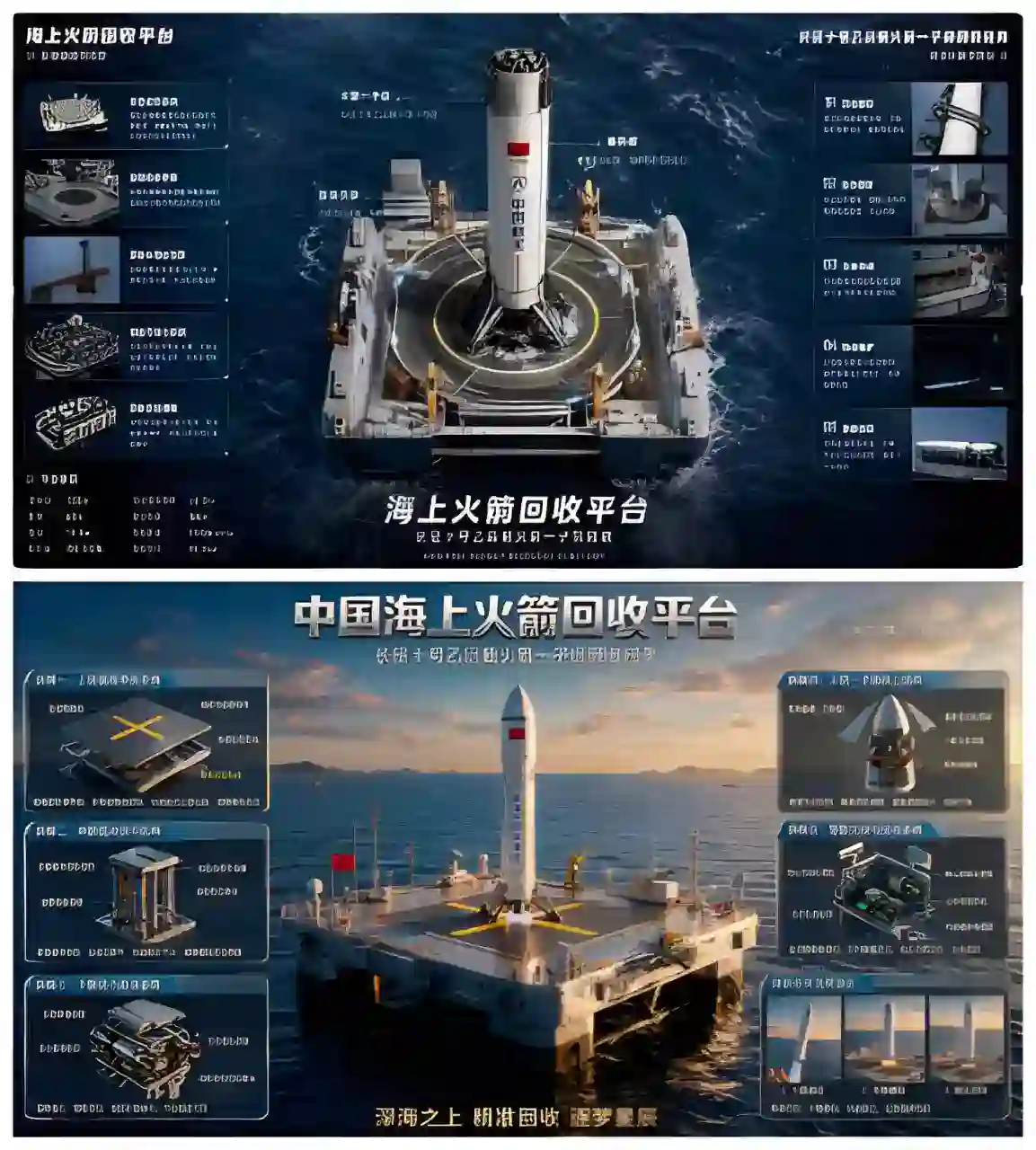
Top image: GPT Images 2.0 output. / Bottom image: Seedream 5.0 Pro output.
For short prompts, GPT Images 2.0 often creates more mature infographic structures because of its stronger information understanding.
However, when users provide detailed requirements about:
layout
visual hierarchy
information structure
design style
Seedream 5.0 Pro can significantly improve and create more polished infographic visuals.
Main Differences Between Seedream 5.0 Pro and GPT Images 2.0
Control vs Understanding.
The biggest difference between these two AI image generators is not simply image quality, but how they approach creation.
GPT Images 2.0: Stronger AI Understanding
GPT Images 2.0 performs well when users provide:
complex concepts
abstract ideas
incomplete descriptions
information-heavy requests
Its advantage is that it can independently interpret user intent and decide how to transform an idea into a visual result.
🔊 However, this stronger interpretation can sometimes introduce more artistic processing, creating images with stronger AI characteristics.
Seedream 5.0 Pro: Stronger Visual Control
Seedream 5.0 Pro focuses more on:
reference-based generation
consistent visual direction
realistic presentation
commercial design workflows
Instead of automatically making creative decisions, it gives creators more control over the final appearance.
💡 This makes Seedream model especially valuable for:
product visuals
brand assets
advertising creatives
character consistency
design projects
Which AI Image Generator Fits Different Creators?
Seedream 5.0 Pro and GPT Images 2.0 serve different creative needs.
Creator Type | Recommended Model | Why |
Creative creators | GPT Images 2.0 | Better at understanding complex ideas and turning simple prompts into creative visuals. |
Professional designers | Seedream 5.0 Pro | Stronger visual control and reference consistency for precise design workflows. |
E-commerce & marketers | Seedream 5.0 Pro | Produces cleaner realism and more stable visual results for commercial content. |
Social media creators | Both | GPT creates more unexpected ideas, while Seedream delivers more polished and consistent visuals. |
AI storytellers & character creators | Seedream 5.0 Pro | Better at maintaining character identity and visual consistency across images. |
Beginners | Both | GPT Images 2.0 understanding simple ideas and turning them into suitable visuals. Seedream 5.0 Pro optimize the image quality, helping users achieve better results even with limited experience. |
Quick Summary:
Choose GPT Images 2.0 for creative exploration and idea generation.
Choose Seedream 5.0 Pro for professional design, and consistent visual production.
Combine both models: use GPT Images 2.0 to explore and validate creative ideas, then use Seedream 5.0 Pro to refine and produce the final polished visuals.
Different AI models for different creative possibilities.
GPT Images 2.0 and Seedream 5.0 Pro represent two different directions in AI image generation.
GPT Images 2.0 focuses on understanding and interpretation, making it powerful for turning complex ideas into visual concepts.
Seedream 5.0 Pro focuses on visual control and design production, helping creators build cleaner, more consistent, and commercially useful image assets.
The best way to find the right tool is to test both models with your own creative tasks.
The future of AI creativity is not about one model replacing another.
It is about choosing the right tool for each creative challenge.
Seedream 5.0 Pro FAQ
Is Seedream 5.0 Pro better than GPT Images 2.0?
Seedream 5.0 Pro is better for users who need visual control, realistic image generation, reference consistency, and professional design output.
GPT Images 2.0 is stronger at understanding ideas and creating concept-driven visuals.
For commercial image production, Seedream 5.0 Pro often provides more predictable and polished results.
Is Seedream 5.0 Pro good for beginners?
Yes. Seedream 5.0 Pro is beginner-friendly because users can achieve high-quality results without advanced design skills.
Its professional visual understanding can automatically improve composition, lighting, and overall image quality, helping beginners create more polished images.
Can Seedream 5.0 Pro create realistic images?
Yes. Seedream 5.0 Pro performs strongly in realistic image generation, especially for portraits, product photography, and lifestyle visuals.
It usually produces cleaner lighting, more natural colors, and a more professional photographic style.
Is Seedream 5.0 Pro good for commercial design?
Yes. Seedream 5.0 Pro is especially suitable for commercial workflows because it provides more controlled and consistent outputs.
Should I use Seedream 5.0 Pro or GPT Images 2.0 first?
A combined workflow can produce better results. Many creators can use GPT Images 2.0 to explore ideas and test creative directions, then use Seedream 5.0 Pro to refine the concept into a consistent, professional final image.
Related Articles
How to Use Sketch Prompts in Seedream 5.0 Pro for AI Design
Learn how to use sketch-to-image workflow in Seedream 5.0 Pro to turn rough layouts, poses, scenes, and design ideas into polished AI images.
Seedream 5.0 Pro Prompt Examples: Smarter AI Image Editing
This article focuses on Seedream 5.0 Pro AI image editing prompt examples: how to edit details and turn a image into a usable final visual.